

Built for iPad.
Log beside your day view instead of covering it. Sidebar navigation, an Add Entry inspector that stays open, Quick Add favorites, and keyboard shortcuts for pointer and keyboard users.
Three panes
Sidebar, day content, and a trailing inspector so Today, History, Trends, and Scan stay usable while you log.
Quick Add
Save frequent foods in the sidebar. Tap to log, or drag a favorite onto the week strip or History calendar.
Keyboard
Shortcuts for new entry, search, scan, destination switching, and CSV export. Arrow keys move between days on Today.
Daily Macros on your Home Screen.
The Daily Macros widget comes in small, medium, and large. Glance at today's protein and carb progress without opening the app. Totals update as you log meals.
Protein at a glance
See how much protein you have logged toward today's goal before you unlock the phone for anything else.
Carbs beside it
The same widget shows total carbs next to protein, so both macros stay visible between meals.
Log with Siri. Describe a meal. Stay on device.
Say what you ate, ask for today's totals, or type a plain-language meal description. Hard-to-read labels can use on-device Apple Intelligence. Nothing in that path is uploaded for someone else's model.
Siri and Shortcuts
Log food by voice, ask how many carbs or how much protein you have logged today, or run the same actions from Shortcuts.
Describe a meal
Type or dictate what you ate. pCarbs drafts protein and carb amounts for you to review before you save.
Smarter labels
When a nutrition label is hard to read, on-device Apple Intelligence can help fill protein and carbs. Images stay on your device.
Track what matters. Nothing more.
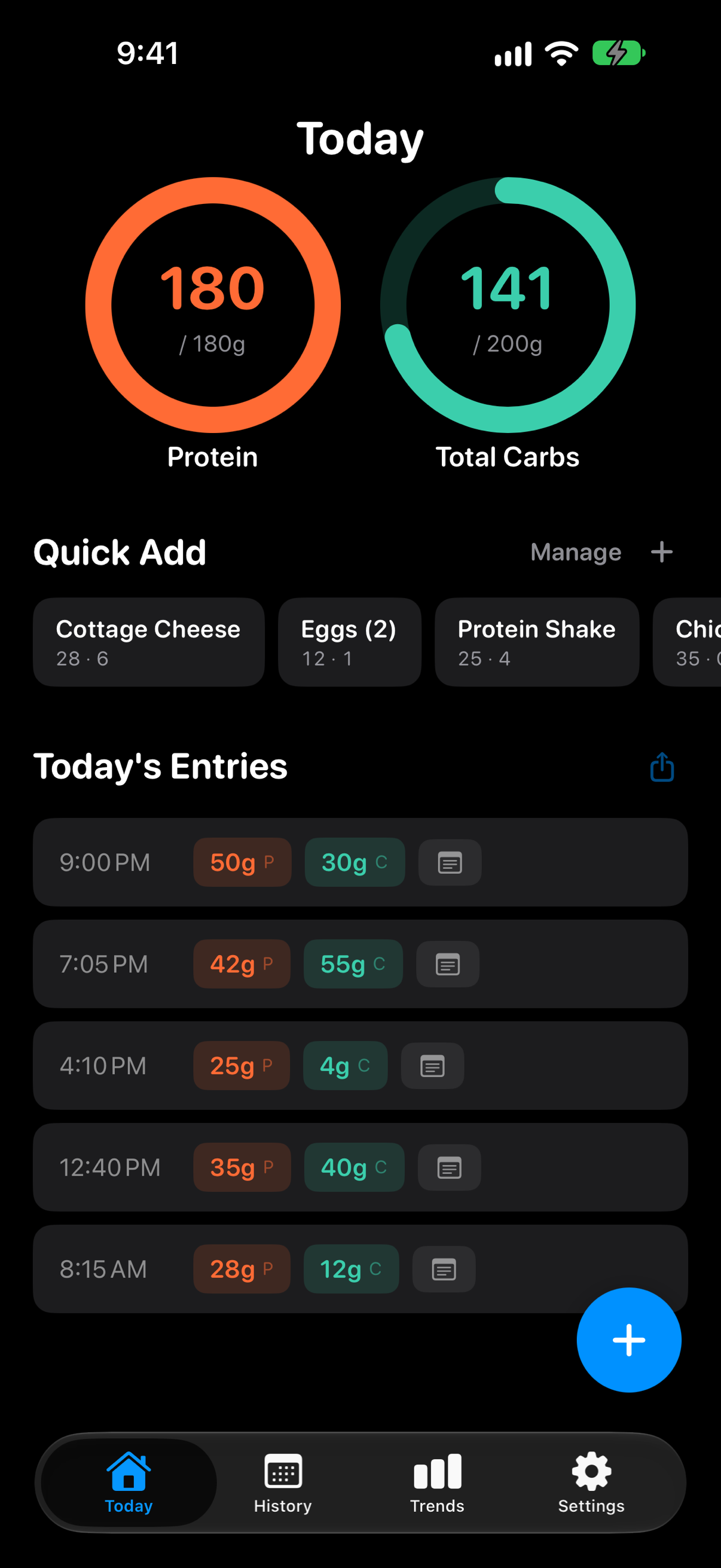
Macro Rings
Visual rings show your protein and total carbs progress at a glance.
Daily Goals
Set personalized macro targets and track them every day.
Food Search
Search thousands of foods by name and get protein and carb info with serving sizes.
Label Scanner
Scan nutrition labels with your camera. Powered by on-device vision, no data leaves your phone.
Apple Health
Sync your macros to Apple Health. Write only, never reads.
Share Your Day
Share a day's macros via link. No personal data, auto-expires in 30 days.
Trend Reports
ProVisualize your nutrition trends over weeks and months.
Data Export
ProExport your data anytime. Your macros, your data.
Built with care. Not with trackers.
Your nutrition data stays on your device and in your iCloud account. That's it.
iCloud Sync
Your data syncs privately through your own iCloud account. We never see it. Even shared links contain only macro numbers, never personal information.
No Ads, Ever
No ad networks, no trackers, no selling your data. You are not the product.
Indie Made
Built by one developer who cares about quality over growth metrics.
Simple pricing.
Free
Everything you need to track.
- Macro tracking
- Daily goals
- Food search
- Label scanning
- Apple Health sync
- Share your day
Pro
$3.99/mo or $39.99/yr
- Everything in Free
- Trend reports
- Data export
- Priority support
Frequently asked questions.
Can't find what you're looking for? Reach out at support@snaapi.co
What does pCarbs track?
pCarbs tracks protein and total carbs. These are the two macros that matter most when you're focused on building muscle and training. We're not ruling out adding more in the future, but right now we keep it focused on what's most useful.
Is my data private?
Yes. There is no account to create. Your logged entries stay on your device and sync through your own iCloud account. When you use food search, your query is sent to our server to look up nutrition data from the USDA database. No personal information is included in that request. When you choose to share a day, only your macro numbers are included. No name, no email, no personal information. Shared links expire automatically after 30 days.
What's included in Pro?
The free version covers everything you need to track your daily macros. Pro adds trend reports, CSV export, and priority support for people who want deeper insight into their progress over time.
Does pCarbs work offline?
Core features like logging and label scanning work fully offline. Your entries are stored locally and sync to iCloud whenever connectivity is available. Food search requires an internet connection to look up nutrition data. Meal describe and on-device Apple Intelligence need Apple Intelligence available on the device.
How do I import my data?
You can import your entries from a spreadsheet (CSV file). Your file should include columns for date, time, protein, and total carbs. A notes column is optional. The headers don't need to match exactly because pCarbs will detect your columns and let you map them before importing. For example, a file with headers like "Date, Time, Protein (g), Total Carbs (g), Notes" will work out of the box.
Can I export my data?
Yes, with Pro. You can export your full history as a spreadsheet anytime, filtered by date range. Your macros, your data, ready to use however you need.
Why only protein and total carbs?
pCarbs is built for people focused on building muscle and training. Protein and total carbs are the macros that matter most for that goal. Calories are important, but we assume clean eating and keep the focus on what drives results.
How does sharing work?
You can share a single day's macro summary with anyone via a link. The shared page only shows your protein and total carbs totals, goals, and entry timestamps. No name, no profile, nothing personally identifiable. Your account is identified internally by a random ID that iCloud generates, not by any personal information. Shared links automatically expire and are deleted after 30 days, and you can revoke a share at any time.
How does food search work?
When you search for a food, your query is sent to our server, which looks up nutrition data from the USDA FoodData Central database. We return protein, carbs, and serving sizes for matching foods. No personal information (your user ID, device info, or logged entries) is included in the request. Results are cached on our server so repeated searches are faster.
How does label scanning work?
Point your camera at a nutrition label and pCarbs will read the protein and total carbs values for you. Processing stays on your device with Apple's vision framework. When a label is hard to read, on-device Apple Intelligence can help fill in protein and carbs. No images are uploaded or stored.
Can I log a meal by describing it?
Yes. When you add an entry, choose Describe and type or dictate what you ate in plain language. pCarbs drafts protein and carb amounts on device for you to review before saving. You can also tell Siri what you ate, or use Shortcuts to log meals and check today's totals.
Does pCarbs have Home Screen widgets?
Yes. Add the Daily Macros widget in small, medium, or large. It shows today's protein and carb progress and updates as you log meals in the app.
Does pCarbs sync with Apple Health?
Yes. pCarbs can write your logged protein and total carbs to Apple Health so your macro data shows up alongside the rest of your health metrics. pCarbs never reads data from Apple Health, and you can revoke access at any time.
Does pCarbs work on iPad?
Yes. On iPad, pCarbs uses a three-pane layout so you can keep Today open while you log. Quick Add favorites, a month calendar History, and keyboard shortcuts are built for the larger screen. Your data stays on your devices and syncs through your own iCloud account.
Start tracking today.
Free on the App Store. No account required.
